Most engineers think support is about “fixing tickets.” It isn’t.
Support engineering is a real-time decision system operating under uncertainty, where engineers continuously observe signals, form hypotheses, test them, and take action.
This post walks through the actual end-to-end workflow followed by L1, L2, and L3 support engineers in real production systems — with real thinking patterns, not just steps.
The Big Picture (High-Level Flow)
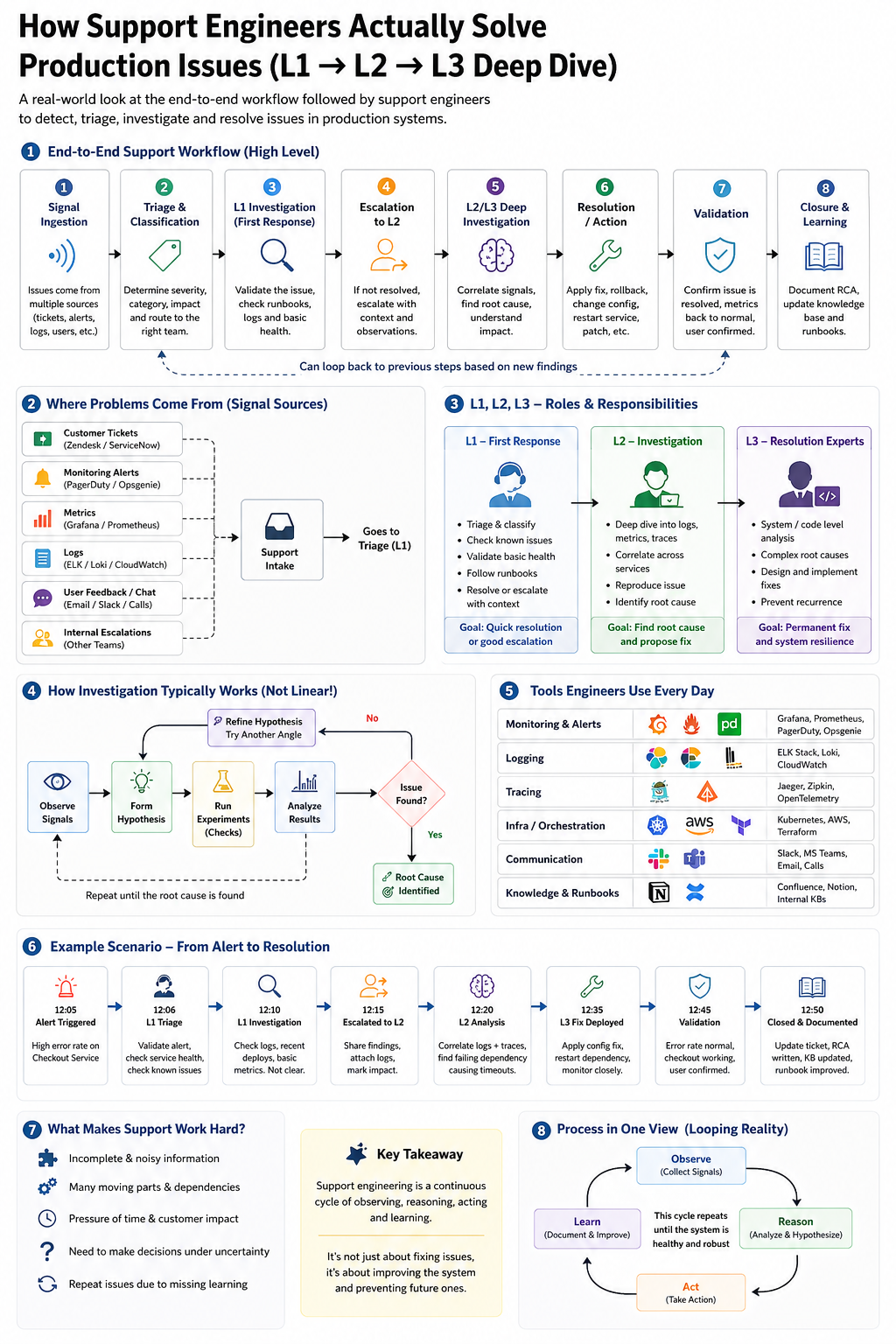
Every incident flows through a common lifecycle:
Signal → Triage → Diagnosis → Action → Validation → Learning
Important: this is not strictly linear. Engineers often loop between steps as new information appears.
1. Signal Ingestion — Where Problems Begin
Incidents originate from multiple sources:
- Customer tickets (e.g., “App is slow”)
- Monitoring alerts (CPU spike, error rate increase)
- Logs showing failures
- Internal escalations from other teams
At this stage, signals are often:
- Incomplete
- Noisy
- Misleading
The first challenge is interpreting ambiguity.
What actually happens in reality
An alert saying “Error rate increased” does NOT tell you:
- Which service failed
- Whether it’s user-facing
- Whether it’s transient or critical
Support begins with turning vague signals into actionable understanding.
2. L1 Engineer — Triage & First Response
L1 engineers are responsible for speed and correctness under limited context.
What L1 does:
- Read and interpret the ticket/alert
- Extract key details:
- What failed?
- When did it start?
- Who is affected?
- Assign:
- Severity (SEV1 / SEV2 / SEV3)
- Category (API, DB, Auth, UI, Infra)
Initial checks:
- Is the service up?
- Are there obvious errors in logs?
- Is this a known issue?
Outcomes:
- Known issue → resolve immediately
- Misrouted → reassign
- Unknown/complex → escalate to L2
Key insight
L1 is not about deep debugging — it’s about fast filtering and correct routing.
3. L2 Engineer — Investigation & Correlation
L2 is where structured debugging begins.
What L2 does:
- Attempt to reproduce the issue
- Correlate multiple signals:
- Logs across services
- Metrics (latency, error rates)
- Recent deployments or config changes
How L2 actually thinks
This is the core loop:
Observe → Hypothesize → Test → Analyze → Repeat
Example:
“Error rate increased after deployment → check recent changes → inspect related service logs → identify failing dependency”
Key insight
L2 work is not linear — it is iterative reasoning under uncertainty.
Outcomes:
- Root cause identified
- Or escalation to L3 for deeper/system-level issues
4. L3 Engineer — Deep Diagnosis & System Fixes
L3 engineers operate at system and code level.
What L3 does:
- Analyze code paths and system architecture
- Debug complex interactions:
- Distributed systems
- Database bottlenecks
- Concurrency/race conditions
Typical actions:
- Patch or hotfix
- Rollback deployment
- Fix configuration
- Redesign faulty components
Key insight
L3 doesn’t just fix symptoms — it fixes why the system allowed the issue to happen.
5. Resolution — Taking Action
Once the issue is understood, action is taken.
Examples:
- Restart a service
- Roll back a release
- Apply configuration fixes
- Deploy patches
Production constraints
Actions must be:
- Safe
- Reversible
- Auditable
Key insight
The best fix is not the fastest one — it’s the one that does not create another incident.
6. Validation — Confirm the Fix
Fixing is not enough.
Engineers must confirm:
- Are metrics back to normal?
- Are error rates reduced?
- Is the system stable?
- Has the customer confirmed resolution?
Key insight
A fix without validation is just a guess that happened to work once.
7. Closure & Learning — The Feedback Loop
After resolution:
- Document the incident
- Write Root Cause Analysis (RCA)
- Update knowledge base
- Improve runbooks
Key insight
Today’s incident becomes tomorrow’s faster resolution — or full automation.
The Reality: This Process is Not Linear
Real support work looks like this:
Observe → Hypothesize → Test → Fail → Retry → Escalate → Re-evaluate → Act
This loop may repeat multiple times before resolution.
Why this matters
If you model this as a straight pipeline, your system will fail.
Support is a looping system with feedback, not a workflow with fixed steps.
What Makes a Strong Support Engineer?
- Ability to work with incomplete information
- Hypothesis-driven thinking
- Strong system understanding
- Knowing where to look (logs, metrics, traces)
- Decision-making under pressure
Why This Matters
- Decision-making
- Reasoning loops
- Tool usage
- Context awareness
The shift in thinking
You are not building a script.
You are building a system that can:
Observe → Reason → Act → Learn
Final Thought
A support engineer is not a ticket resolver.
They are a real-time reasoning system operating on noisy, incomplete signals in a live production environment.
Understand this deeply.